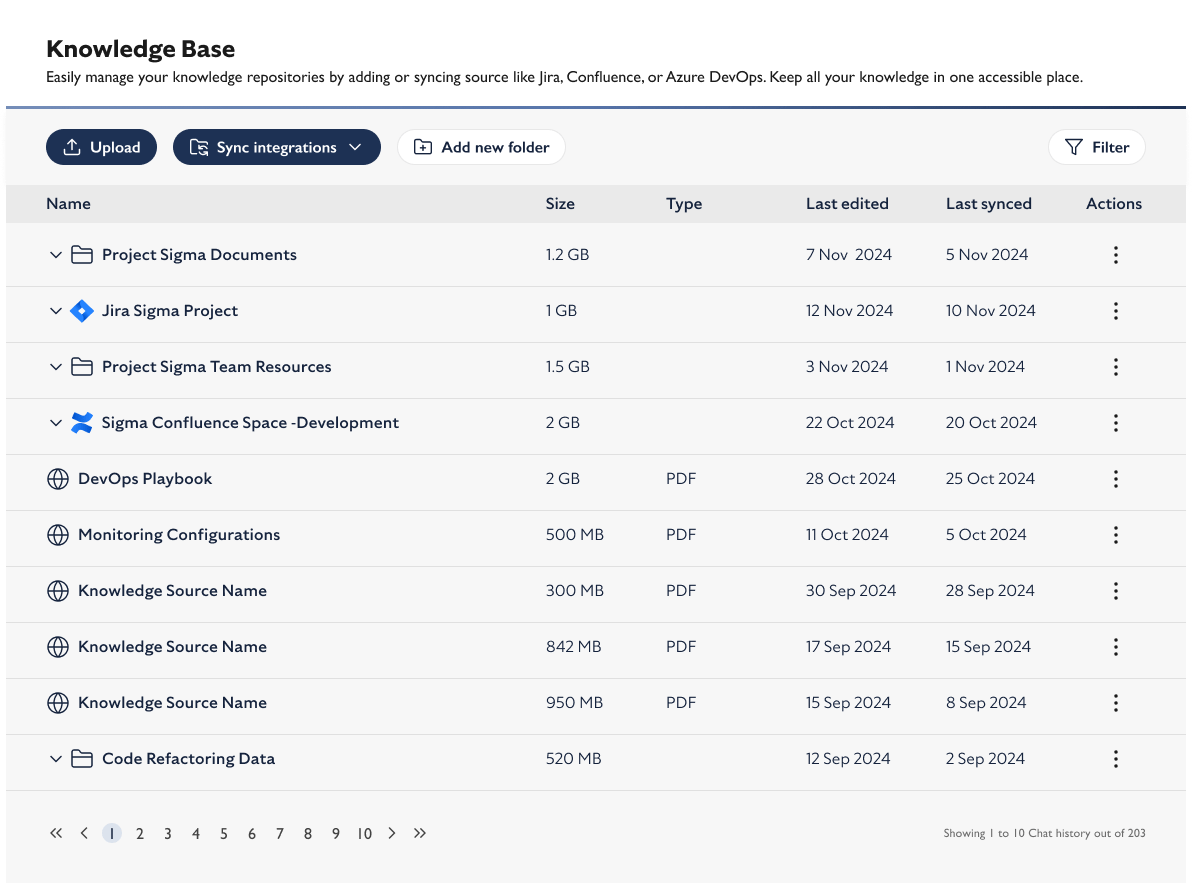
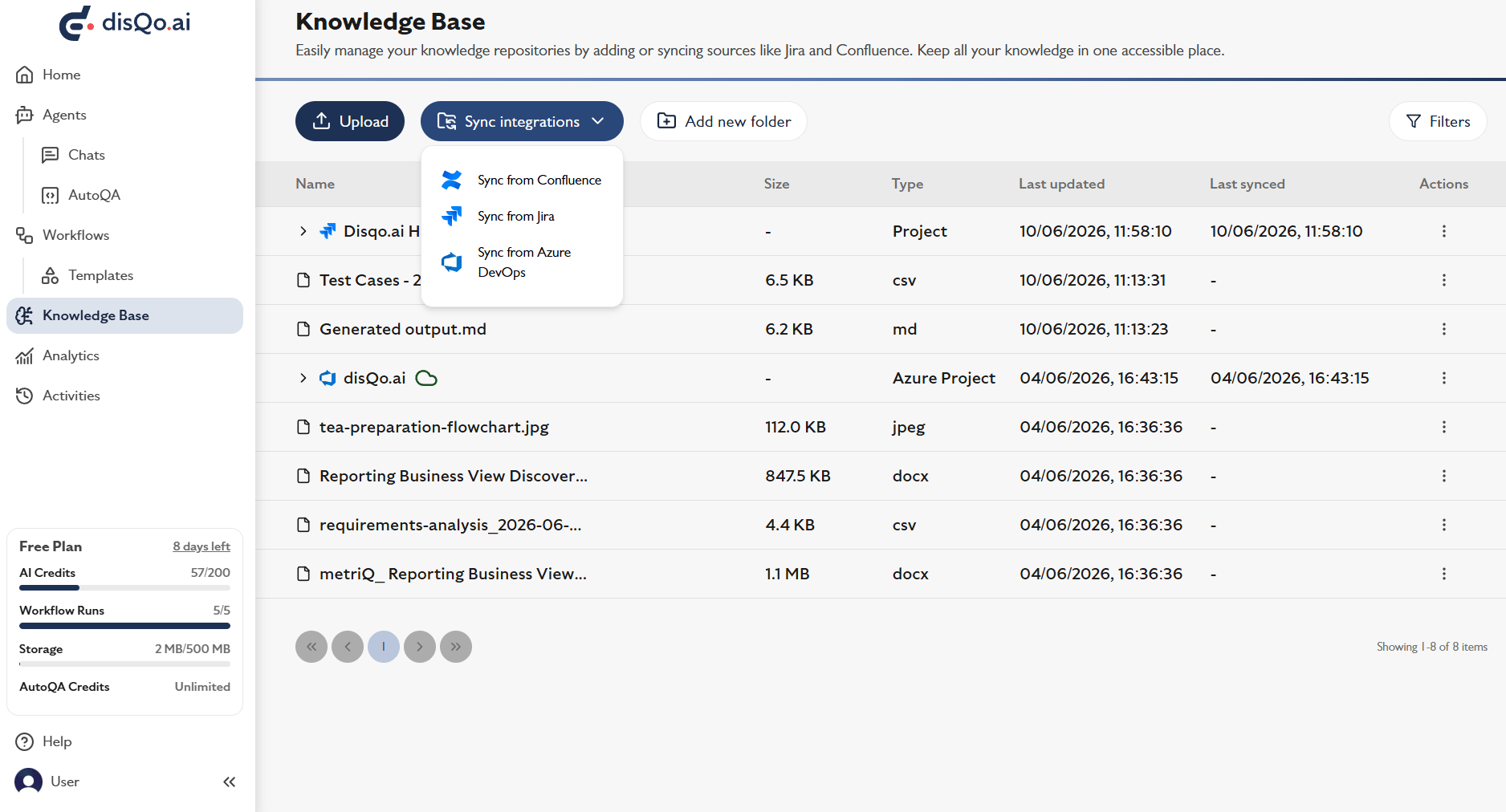
Learn how to create and manage your knowledge base in disQo.ai
The Knowledge Base in disQo.ai allows you to centralise all your important documents, files, and data sources in one accessible location. Easily upload, organise, and sync information from platforms like Jira and Confluence to power your automations and workflows.
If you see a message that your integration is not connected, ensure you have authorised access to your Confluence or Jira account and try again.
Only upload files you have permission to share.
Keep your knowledge base up to date by regularly syncing with your integrations.
Use filters to quickly find relevant documents.
Your Knowledge Base is now set up! You can start using your documents and synced data in workflows and automations across disQo.ai.
{"docsConfig":{"theme":"mint","$schema":"https://mintlify.com/docs.json","name":"disQo.ai Documentation","colors":{"primary":"#1D3154","light":"#f24957","dark":"#1D3154"},"logo":{"light":"https://mintcdn.com/disqoai/ulbgJYDwvpc77gNm/logo/light.svg?fit=max\u0026auto=format\u0026n=ulbgJYDwvpc77gNm\u0026q=85\u0026s=6c71adc98fdc231d7d233c83dec7ece3","dark":"https://mintcdn.com/disqoai/ulbgJYDwvpc77gNm/logo/dark.svg?fit=max\u0026auto=format\u0026n=ulbgJYDwvpc77gNm\u0026q=85\u0026s=abd62ee2938db511c359da839f500bef"},"favicon":"https://mintcdn.com/disqoai/ulbgJYDwvpc77gNm/favicon.svg?fit=max\u0026auto=format\u0026n=ulbgJYDwvpc77gNm\u0026q=85\u0026s=41c2f39553ce84943f99aaad8fd0a074","appearance":{"default":"light"},"background":{"color":{"light":"#ffffff","dark":"#1a1a1a"}},"navbar":{"links":[{"href":"https://disqoai.com/","label":"Home"},{"href":"https://tiqtoq-uk.atlassian.net/servicedesk/customer/portal/4","label":"Contact"}],"primary":{"type":"button","label":"disQo.ai App","href":"https://app.disqoai.com"}},"footer":{"socials":{"linkedin":"https://www.linkedin.com/company/tiqtoq-ltd","x":"https://x.com/tiqtoqassurance"}},"icons":{"library":"lucide"},"styling":{"latex":false},"navigation":{"pages":[]}},"deployment":{"deploymentMetadataValue":{"subdomain":"disqoai","hasAudioNarration":false,"actualSubdomain":"disqoai","customDomains":["docs.disqoai.com"],"gitSource":{"type":"github","owner":"tiqtoq-uk","repo":"docs.disqoai.com","deployBranch":"main","contentDirectory":"","isPrivate":true,"mountPath":"","label":""},"chroma":{"liveDeploymentHistoryId":"6ab503f57969600ed2887b39","collectionId":"ff16a0b6-b717-4e33-8209-6737289a4c80","schemaVersion":"v3","latestBuiltDeploymentHistoryId":"6ab503f57969600ed2887b39"},"entitlements":{},"buildId":"6ab503f57969600ed2887b39","clientVersion":"0.0.3952","searchFilterCounts":[{"language":"default","tag":"Platform","count":14},{"language":"default","tag":"Collaboration","count":4},{"language":"default","tag":"Get Started","count":3},{"language":"default","tag":"Settings \u0026 Billing","count":3},{"language":"default","tag":"Workflows","count":3},{"language":"default","tag":"Agents","count":2},{"language":"default","tag":"Data Privacy \u0026 Security","count":2},{"language":"default","tag":"Activities","count":1},{"language":"default","tag":"Analytics","count":1},{"language":"default","tag":"Auto QA","count":1}]},"assistantConfig":{},"hasChatPermissions":false,"hasWebMcpPermissions":false,"toggles":[{"name":"kill-isr","enabled":true,"variant":{"name":"disabled","enabled":false,"feature_enabled":true},"impressionData":false},{"name":"agent-mintlify-slack","enabled":true,"variant":{"name":"disabled","enabled":false,"feature_enabled":true},"impressionData":false},{"name":"editor-v7-file-tree","enabled":true,"variant":{"name":"disabled","enabled":false,"feature_enabled":true},"impressionData":false},{"name":"agent-integrations-settings","enabled":true,"variant":{"name":"disabled","enabled":false,"feature_enabled":true},"impressionData":false},{"name":"automations-pr-grouping","enabled":true,"variant":{"name":"disabled","enabled":false,"feature_enabled":true},"impressionData":false},{"name":"custom-prefix","enabled":true,"variant":{"name":"disabled","enabled":false,"feature_enabled":true},"impressionData":false},{"name":"analytics-v7","enabled":true,"variant":{"name":"disabled","enabled":false,"feature_enabled":true},"impressionData":false},{"name":"user-flows-analytics","enabled":true,"variant":{"name":"disabled","enabled":false,"feature_enabled":true},"impressionData":false},{"name":"no-publish-flow","enabled":true,"variant":{"name":"disabled","enabled":false,"feature_enabled":true},"impressionData":false},{"name":"workos-onboarding","enabled":true,"variant":{"name":"disabled","enabled":false,"feature_enabled":true},"impressionData":false},{"name":"llms-txt-v2","enabled":true,"variant":{"name":"disabled","enabled":false,"feature_enabled":true},"impressionData":false},{"name":"pause-universal-search-reconcile","enabled":true,"variant":{"name":"disabled","enabled":false,"feature_enabled":true},"impressionData":false},{"name":"snapshot-serving-live","enabled":true,"variant":{"name":"disabled","enabled":false,"feature_enabled":true},"impressionData":false},{"name":"stripTemperatureMiddleware","enabled":true,"variant":{"name":"disabled","enabled":false,"feature_enabled":true},"impressionData":false},{"name":"per-site-search-delta","enabled":true,"variant":{"name":"disabled","enabled":false,"feature_enabled":true},"impressionData":false},{"name":"support-platform-pylon-zendesk","enabled":true,"variant":{"name":"disabled","enabled":false,"feature_enabled":true},"impressionData":false},{"name":"snapshot-serving","enabled":true,"variant":{"name":"disabled","enabled":false,"feature_enabled":true},"impressionData":false},{"name":"instant-rollback","enabled":true,"variant":{"name":"disabled","enabled":false,"feature_enabled":true},"impressionData":false},{"name":"granular-notifications-server","enabled":true,"variant":{"name":"disabled","enabled":false,"feature_enabled":true},"impressionData":false},{"name":"granular-notifications","enabled":true,"variant":{"name":"disabled","enabled":false,"feature_enabled":true},"impressionData":false},{"name":"editor-private-page-search","enabled":true,"variant":{"name":"disabled","enabled":false,"feature_enabled":true},"impressionData":false},{"name":"automations-fable","enabled":true,"variant":{"name":"disabled","enabled":false,"feature_enabled":true},"impressionData":false},{"name":"fixed-ai-action-pricing","enabled":true,"variant":{"name":"disabled","enabled":false,"feature_enabled":true},"impressionData":false},{"name":"automation-resolve-merge-conflict","enabled":true,"variant":{"name":"disabled","enabled":false,"feature_enabled":true},"impressionData":false},{"name":"scoped-publishing","enabled":true,"variant":{"name":"disabled","enabled":false,"feature_enabled":true},"impressionData":false},{"name":"mintql","enabled":true,"variant":{"name":"disabled","enabled":false,"feature_enabled":true},"impressionData":false},{"name":"page-level-analytics","enabled":true,"variant":{"name":"disabled","enabled":false,"feature_enabled":true},"impressionData":false},{"name":"editor-version-history-v2","enabled":true,"variant":{"name":"disabled","enabled":false,"feature_enabled":true},"impressionData":false},{"name":"editor-nav-generations","enabled":true,"variant":{"name":"disabled","enabled":false,"feature_enabled":true},"impressionData":false},{"name":"billing-page-v2","enabled":true,"variant":{"name":"disabled","enabled":false,"feature_enabled":true},"impressionData":false},{"name":"workspace-projects","enabled":true,"variant":{"name":"disabled","enabled":false,"feature_enabled":true},"impressionData":false},{"name":"assistant-v5","enabled":true,"variant":{"name":"disabled","enabled":false,"feature_enabled":true},"impressionData":false},{"name":"byok-sep-25","enabled":true,"variant":{"name":"disabled","enabled":false,"feature_enabled":true},"impressionData":false},{"name":"fork-pr-previews","enabled":true,"variant":{"name":"disabled","enabled":false,"feature_enabled":true},"impressionData":false},{"name":"revalidation-jwt","enabled":true,"variant":{"name":"disabled","enabled":false,"feature_enabled":true},"impressionData":false},{"name":"vite-origin","enabled":true,"variant":{"name":"disabled","enabled":false,"feature_enabled":true},"impressionData":false},{"name":"editor-agent-model-picker","enabled":true,"variant":{"name":"disabled","enabled":false,"feature_enabled":true},"impressionData":false},{"name":"billing-updated-9-15","enabled":true,"variant":{"name":"disabled","enabled":false,"feature_enabled":true},"impressionData":false},{"name":"hobby-abuse-scan","enabled":true,"variant":{"name":"disabled","enabled":false,"feature_enabled":true},"impressionData":false},{"name":"dashboard-inbox","enabled":true,"variant":{"name":"disabled","enabled":false,"feature_enabled":true},"impressionData":false}],"isAtlas":false,"googleFontsInlined":false},"customCss":[],"page":{"pagePath":"knowledge-base/overview","slug":"/knowledge-base/overview","pageMetadata":{"title":"Overview","description":"Learn how to create and manage your knowledge base in disQo.ai","href":"/knowledge-base/overview"},"description":{"compiledSource":"\"use strict\";\nconst {jsx: _jsx} = arguments[0];\nconst {useMDXComponents: _provideComponents} = arguments[0];\nfunction _createMdxContent(props) {\n const _components = {\n p: \"p\",\n ..._provideComponents(),\n ...props.components\n };\n return _jsx(_components.p, {\n children: \"Learn how to create and manage your knowledge base in disQo.ai\"\n });\n}\nfunction MDXContent(props = {}) {\n const {wrapper: MDXLayout} = {\n ..._provideComponents(),\n ...props.components\n };\n return MDXLayout ? _jsx(MDXLayout, {\n ...props,\n children: _jsx(_createMdxContent, {\n ...props\n })\n }) : _createMdxContent(props);\n}\nreturn {\n default: MDXContent\n};\n","frontmatter":{},"scope":{}},"pageType":"default","mdx":{"mdxSource":{"compiledSource":"\"use strict\";const{Fragment:_Fragment,jsx:_jsx,jsxs:_jsxs}=arguments[0];const{useMDXComponents:_provideComponents}=arguments[0];function _createMdxContent(props){const _components={li:`li`,p:`p`,strong:`strong`,tbody:`tbody`,td:`td`,th:`th`,thead:`thead`,tr:`tr`,ul:`ul`,..._provideComponents(),...props.components},{Check,Frame,Heading,Info,OptimizedImage,Step,Steps,Table,Tip,Warning}=_components;if(!Check)_missingMdxReference(`Check`,true);if(!Frame)_missingMdxReference(`Frame`,true);if(!Heading)_missingMdxReference(`Heading`,true);if(!Info)_missingMdxReference(`Info`,true);if(!OptimizedImage)_missingMdxReference(`OptimizedImage`,true);if(!Step)_missingMdxReference(`Step`,true);if(!Steps)_missingMdxReference(`Steps`,true);if(!Table)_missingMdxReference(`Table`,true);if(!Tip)_missingMdxReference(`Tip`,true);if(!Warning)_missingMdxReference(`Warning`,true);return _jsxs(_Fragment,{children:[_jsx(Info,{children:_jsx(_components.p,{children:`The Knowledge Base in disQo.ai allows you to centralise all your important documents, files, and data sources in one accessible location. Easily upload, organise, and sync information from platforms like Jira and Confluence to power your automations and workflows.`})}),`\n`,_jsx(Heading,{level:`2`,id:`getting-started-with-knowledge-base`,children:`Getting Started with Knowledge Base`}),`\n`,_jsxs(Steps,{children:[_jsxs(Step,{title:`Navigate to Knowledge Base`,children:[_jsx(_components.p,{children:`Select from the sidebar to access your repository of documents and integrations.`}),_jsx(Frame,{caption:`Knowledge Base main page UI`,children:_jsx(OptimizedImage,{src:`https://mintcdn.com/disqoai/-mc91wSZAGkRxrTF/images/Table-and-Action-Structure.png?fit=max\u0026auto=format\u0026n=-mc91wSZAGkRxrTF\u0026q=85\u0026s=d1519edb9b3e03d7afbd5e4e8e70d076`,alt:`Table And Action Structure`,\"data-og-width\":`1192`,width:`1192`,\"data-og-height\":`883`,height:`883`,\"data-path\":`images/Table-and-Action-Structure.png`,\"data-optimize\":`true`,\"data-opv\":`3`,srcset:`https://mintcdn.com/disqoai/-mc91wSZAGkRxrTF/images/Table-and-Action-Structure.png?w=280\u0026fit=max\u0026auto=format\u0026n=-mc91wSZAGkRxrTF\u0026q=85\u0026s=eb7f2ad78593fd8f5d2dafc4c728276c 280w, https://mintcdn.com/disqoai/-mc91wSZAGkRxrTF/images/Table-and-Action-Structure.png?w=560\u0026fit=max\u0026auto=format\u0026n=-mc91wSZAGkRxrTF\u0026q=85\u0026s=e55d3641860f5aacf25238cf59df77fe 560w, https://mintcdn.com/disqoai/-mc91wSZAGkRxrTF/images/Table-and-Action-Structure.png?w=840\u0026fit=max\u0026auto=format\u0026n=-mc91wSZAGkRxrTF\u0026q=85\u0026s=d05cb18a8315fc445b09af5881ad7ca1 840w, https://mintcdn.com/disqoai/-mc91wSZAGkRxrTF/images/Table-and-Action-Structure.png?w=1100\u0026fit=max\u0026auto=format\u0026n=-mc91wSZAGkRxrTF\u0026q=85\u0026s=698dd698e370f628048096f45c72115e 1100w, https://mintcdn.com/disqoai/-mc91wSZAGkRxrTF/images/Table-and-Action-Structure.png?w=1650\u0026fit=max\u0026auto=format\u0026n=-mc91wSZAGkRxrTF\u0026q=85\u0026s=e6b40f2b6282463ed1dab0d6d00831c2 1650w, https://mintcdn.com/disqoai/-mc91wSZAGkRxrTF/images/Table-and-Action-Structure.png?w=2500\u0026fit=max\u0026auto=format\u0026n=-mc91wSZAGkRxrTF\u0026q=85\u0026s=a04d9dcd3afbb2643b70e75b7dc4c48b 2500w`})})]}),_jsx(Step,{title:`Upload Files or Folders`,children:_jsx(_components.p,{children:`Click to add files or folders. You can drag and drop, or browse to select files. Maximum single file size: 5MB.`})}),_jsxs(Step,{title:`Sync Integrations`,children:[_jsx(_components.p,{children:`Use to connect and import data from Confluence, Azure DevOps, and Jira.`}),_jsx(Frame,{children:_jsx(OptimizedImage,{src:`https://mintcdn.com/disqoai/-mc91wSZAGkRxrTF/images/Screenshot-2026-06-10-172617.png?fit=max\u0026auto=format\u0026n=-mc91wSZAGkRxrTF\u0026q=85\u0026s=fca421df456215a4fa1188c6e749a942`,alt:`Screenshot 2026 06 10 172617`,\"data-og-width\":`1876`,width:`1876`,\"data-og-height\":`1012`,height:`1012`,\"data-path\":`images/Screenshot-2026-06-10-172617.png`,\"data-optimize\":`true`,\"data-opv\":`3`,srcset:`https://mintcdn.com/disqoai/-mc91wSZAGkRxrTF/images/Screenshot-2026-06-10-172617.png?w=280\u0026fit=max\u0026auto=format\u0026n=-mc91wSZAGkRxrTF\u0026q=85\u0026s=8ab938cbb70af51e7e09c4cf2e3a43e8 280w, https://mintcdn.com/disqoai/-mc91wSZAGkRxrTF/images/Screenshot-2026-06-10-172617.png?w=560\u0026fit=max\u0026auto=format\u0026n=-mc91wSZAGkRxrTF\u0026q=85\u0026s=0d045a131090dba2795632f59fde5c73 560w, https://mintcdn.com/disqoai/-mc91wSZAGkRxrTF/images/Screenshot-2026-06-10-172617.png?w=840\u0026fit=max\u0026auto=format\u0026n=-mc91wSZAGkRxrTF\u0026q=85\u0026s=683e66086793031c16cc0031f5653cc3 840w, https://mintcdn.com/disqoai/-mc91wSZAGkRxrTF/images/Screenshot-2026-06-10-172617.png?w=1100\u0026fit=max\u0026auto=format\u0026n=-mc91wSZAGkRxrTF\u0026q=85\u0026s=66dc57becc208ba903a86d37b5e2c4d6 1100w, https://mintcdn.com/disqoai/-mc91wSZAGkRxrTF/images/Screenshot-2026-06-10-172617.png?w=1650\u0026fit=max\u0026auto=format\u0026n=-mc91wSZAGkRxrTF\u0026q=85\u0026s=c1578820d526e80317350b6b8d7b92e7 1650w, https://mintcdn.com/disqoai/-mc91wSZAGkRxrTF/images/Screenshot-2026-06-10-172617.png?w=2500\u0026fit=max\u0026auto=format\u0026n=-mc91wSZAGkRxrTF\u0026q=85\u0026s=8a60e99dbee914a7a636a351aa526895 2500w`})})]})]}),`\n`,_jsx(Heading,{level:`2`,id:`supported-file-types-\u0026-limits`,children:`Supported File Types \u0026 Limits`}),`\n`,_jsxs(Table,{children:[_jsx(_components.thead,{children:_jsxs(_components.tr,{children:[_jsx(_components.th,{children:`File Type`}),_jsx(_components.th,{children:`Extensions`})]})}),_jsxs(_components.tbody,{children:[_jsxs(_components.tr,{children:[_jsx(_components.td,{children:`Document`}),_jsx(_components.td,{children:`.pdf, .txt, .md, .docx`})]}),_jsxs(_components.tr,{children:[_jsx(_components.td,{children:`Data`}),_jsx(_components.td,{children:`.csv, .xml, .json, .xls(x)`})]}),_jsxs(_components.tr,{children:[_jsx(_components.td,{children:`Slides`}),_jsx(_components.td,{children:`.pptx`})]}),_jsxs(_components.tr,{children:[_jsx(_components.td,{children:`Images`}),_jsx(_components.td,{children:`.png .jpeg .jpg`})]})]})]}),`\n`,_jsxs(_components.ul,{children:[`\n`,_jsx(_components.li,{children:`5MB`}),`\n`,_jsx(_components.li,{children:`Supported for bulk upload and organisation`}),`\n`]}),`\n`,_jsx(Tip,{children:_jsx(_components.p,{children:`Organise your files into folders for easier management. Use clear, descriptive names for files and folders to improve search and automation accuracy.`})}),`\n`,_jsx(Heading,{level:`2`,id:`using-files-in-chats`,children:`Using Files in Chats`}),`\n`,_jsx(_components.p,{children:`You do not need to upload every file to the Knowledge Base before using it with an agent. You have two options:`}),`\n`,_jsxs(_components.ul,{children:[`\n`,_jsxs(_components.li,{children:[_jsx(_components.strong,{children:`Upload a file directly from your computer`}),` — use files temporarily in a single Chat without storing them permanently.`]}),`\n`,_jsxs(_components.li,{children:[_jsx(_components.strong,{children:`Select an existing file from the Knowledge Base`}),` — use files you have already uploaded and organised.`]}),`\n`]}),`\n`,_jsx(_components.p,{children:_jsx(_components.strong,{children:`When to use each approach:`})}),`\n`,_jsxs(_components.ul,{children:[`\n`,_jsx(_components.li,{children:`Use direct uploads for temporary or Chat-specific context that you do not need to reuse across multiple Chats or Workflows.`}),`\n`,_jsx(_components.li,{children:`Use the Knowledge Base for files that you want to organise, store, and reuse across multiple Chats and Workflows.`}),`\n`]}),`\n`,_jsx(Heading,{level:`2`,id:`troubleshooting-\u0026-best-practices`,children:`Troubleshooting \u0026 Best Practices`}),`\n`,_jsx(Warning,{children:_jsx(_components.p,{children:`If you see a message that your integration is not connected, ensure you have authorised access to your Confluence or Jira account and try again.`})}),`\n`,_jsxs(_components.ul,{children:[`\n`,_jsx(_components.li,{children:`Only upload files you have permission to share.`}),`\n`,_jsx(_components.li,{children:`Keep your knowledge base up to date by regularly syncing with your integrations.`}),`\n`,_jsx(_components.li,{children:`Use filters to quickly find relevant documents.`}),`\n`]}),`\n`,_jsx(Check,{children:_jsx(_components.p,{children:`Your Knowledge Base is now set up! You can start using your documents and synced data in workflows and automations across disQo.ai.`})})]})}function MDXContent(props={}){const{wrapper:MDXLayout}={..._provideComponents(),...props.components};return MDXLayout?_jsx(MDXLayout,{...props,children:_jsx(_createMdxContent,{...props})}):_createMdxContent(props)}return{default:MDXContent};function _missingMdxReference(id,component){throw new Error(`Expected `+(component?`component`:`object`)+\" `\"+id+\"` to be defined: you likely forgot to import, pass, or provide it.\")}","frontmatter":{},"scope":{"config":{},"pageMetadata":{"title":"Overview","description":"Learn how to create and manage your knowledge base in disQo.ai","href":"/knowledge-base/overview"}}},"mdxSourceWithNoJs":null},"mdxExtracts":{"tableOfContents":[{"title":"Getting Started with Knowledge Base","slug":"getting-started-with-knowledge-base","depth":2,"children":[]},{"title":"Supported File Types \u0026 Limits","slug":"supported-file-types-\u0026-limits","depth":2,"children":[]},{"title":"Using Files in Chats","slug":"using-files-in-chats","depth":2,"children":[]},{"title":"Troubleshooting \u0026 Best Practices","slug":"troubleshooting-\u0026-best-practices","depth":2,"children":[]}],"codeExamples":{}},"jsLinks":[],"subdomain":"disqoai","siteName":"disQo.ai Documentation","title":"Overview - disQo.ai Documentation","navMaps":{"firstHrefInVersion":{},"firstHrefInLanguage":{}},"lastModified":"2026-09-24T11:03:19.182Z","originalFileLocation":"knowledge-base/overview.mdx"},"headHtml":"\u003cscript data-mint-head>(function(){var d=document.documentElement,p=null;if(!p){try{p=localStorage.getItem(\"isDarkMode\")}catch(e){}if(p==='true')p='dark';else if(p==='false')p='light';if(p!=='light'\u0026\u0026p!=='dark'\u0026\u0026p!=='system')p=\"light\"}var r=p==='system'?(matchMedia(\"(prefers-color-scheme: dark)\").matches?'dark':'light'):p;d.classList.remove(r==='dark'?'light':'dark');d.classList.add(r);d.setAttribute(\"data-theme-preference\",p)})();\u003c/script>\u003cmeta data-mint-head name=\"description\" content=\"Learn how to create and manage your knowledge base in disQo.ai\">\u003cmeta data-mint-head name=\"application-name\" content=\"disQo.ai Documentation\">\u003cmeta data-mint-head name=\"generator\" content=\"Mintlify\">\u003clink data-mint-head rel=\"icon\" type=\"image/png\" sizes=\"192x192\" href=\"/mintlify-assets/_mintlify/favicons/disqoai/LUYwUI47ALszLYmf/_generated/favicon/android-chrome-192x192.png\" media=\"(prefers-color-scheme: light)\">\u003clink data-mint-head rel=\"apple-touch-icon\" type=\"image/png\" sizes=\"180x180\" href=\"/mintlify-assets/_mintlify/favicons/disqoai/LUYwUI47ALszLYmf/_generated/favicon/apple-touch-icon.png\">\u003clink data-mint-head rel=\"icon\" type=\"image/png\" sizes=\"16x16\" href=\"/mintlify-assets/_mintlify/favicons/disqoai/LUYwUI47ALszLYmf/_generated/favicon/favicon-16x16.png\" media=\"(prefers-color-scheme: light)\">\u003clink data-mint-head rel=\"icon\" type=\"image/png\" sizes=\"32x32\" href=\"/mintlify-assets/_mintlify/favicons/disqoai/LUYwUI47ALszLYmf/_generated/favicon/favicon-32x32.png\" media=\"(prefers-color-scheme: light)\">\u003clink data-mint-head rel=\"shortcut icon\" type=\"image/x-icon\" href=\"/mintlify-assets/_mintlify/favicons/disqoai/LUYwUI47ALszLYmf/_generated/favicon/favicon.ico\" media=\"(prefers-color-scheme: light)\">\u003clink data-mint-head rel=\"icon\" type=\"image/png\" sizes=\"192x192\" href=\"/mintlify-assets/_mintlify/favicons/disqoai/LUYwUI47ALszLYmf/_generated/favicon-dark/android-chrome-192x192.png\" media=\"(prefers-color-scheme: dark)\">\u003clink data-mint-head rel=\"icon\" type=\"image/png\" sizes=\"16x16\" href=\"/mintlify-assets/_mintlify/favicons/disqoai/LUYwUI47ALszLYmf/_generated/favicon-dark/favicon-16x16.png\" media=\"(prefers-color-scheme: dark)\">\u003clink data-mint-head rel=\"icon\" type=\"image/png\" sizes=\"32x32\" href=\"/mintlify-assets/_mintlify/favicons/disqoai/LUYwUI47ALszLYmf/_generated/favicon-dark/favicon-32x32.png\" media=\"(prefers-color-scheme: dark)\">\u003clink data-mint-head rel=\"shortcut icon\" type=\"image/x-icon\" href=\"/mintlify-assets/_mintlify/favicons/disqoai/LUYwUI47ALszLYmf/_generated/favicon-dark/favicon.ico\" media=\"(prefers-color-scheme: dark)\">\u003cmeta data-mint-head property=\"og:title\" content=\"Overview - disQo.ai Documentation\">\u003cmeta data-mint-head property=\"og:description\" content=\"Learn how to create and manage your knowledge base in disQo.ai\">\u003cmeta data-mint-head property=\"og:site_name\" content=\"disQo.ai Documentation\">\u003cmeta data-mint-head property=\"og:url\" content=\"https://docs.disqoai.com/knowledge-base/overview\">\u003cmeta data-mint-head property=\"og:type\" content=\"website\">\u003cmeta data-mint-head property=\"og:image\" content=\"https://disqoai.mintlify.app/_mintlify/api/og/v2?division=Knowledge+Base\u0026amp;title=Overview\u0026amp;description=Learn+how+to+create+and+manage+your+knowledge+base+in+disQo.ai\u0026amp;theme=fd355ebb9fe2b5bea6fd934e\u0026amp;signature=6dcfb882aa1ab892568d71e5664da61eef9902d7ed3dce6f6b6b1d66eb177176\">\u003cmeta data-mint-head property=\"og:image:width\" content=\"1200\">\u003cmeta data-mint-head property=\"og:image:height\" content=\"630\">\u003cmeta data-mint-head name=\"twitter:card\" content=\"summary_large_image\">\u003cmeta data-mint-head name=\"twitter:title\" content=\"Overview - disQo.ai Documentation\">\u003cmeta data-mint-head name=\"twitter:description\" content=\"Learn how to create and manage your knowledge base in disQo.ai\">\u003cmeta data-mint-head name=\"twitter:image\" content=\"https://disqoai.mintlify.app/_mintlify/api/og/v2?division=Knowledge+Base\u0026amp;title=Overview\u0026amp;description=Learn+how+to+create+and+manage+your+knowledge+base+in+disQo.ai\u0026amp;theme=fd355ebb9fe2b5bea6fd934e\u0026amp;signature=6dcfb882aa1ab892568d71e5664da61eef9902d7ed3dce6f6b6b1d66eb177176\">\u003cmeta data-mint-head name=\"twitter:image:width\" content=\"1200\">\u003cmeta data-mint-head name=\"twitter:image:height\" content=\"630\">\u003cmeta data-mint-head name=\"msapplication-config\" content=\"/mintlify-assets/_mintlify/favicons/disqoai/LUYwUI47ALszLYmf/_generated/favicon/browserconfig.xml\">\u003cmeta data-mint-head name=\"apple-mobile-web-app-title\" content=\"disQo.ai Documentation\">\u003cmeta data-mint-head name=\"msapplication-TileColor\" content=\"#1D3154\">\u003clink data-mint-head rel=\"canonical\" href=\"https://docs.disqoai.com/knowledge-base/overview\">\u003clink data-mint-head rel=\"alternate\" type=\"application/xml\" href=\"/sitemap.xml\">\u003clink data-mint-head rel=\"alternate\" type=\"text/markdown\" href=\"/knowledge-base/overview.md\">\u003cscript data-mint-head type=\"application/ld+json\">{\"@context\":\"https://schema.org\",\"@graph\":[{\"@type\":\"Organization\",\"@id\":\"https://docs.disqoai.com/#organization\",\"name\":\"disQo.ai Documentation\",\"url\":\"https://docs.disqoai.com\",\"logo\":{\"@type\":\"ImageObject\",\"url\":\"https://mintcdn.com/disqoai/ulbgJYDwvpc77gNm/logo/light.svg?fit=max\u0026auto=format\u0026n=ulbgJYDwvpc77gNm\u0026q=85\u0026s=6c71adc98fdc231d7d233c83dec7ece3\"}},{\"@type\":\"WebSite\",\"@id\":\"https://docs.disqoai.com#website\",\"name\":\"disQo.ai Documentation\",\"url\":\"https://docs.disqoai.com\",\"publisher\":{\"@id\":\"https://docs.disqoai.com/#organization\"}},{\"@type\":\"WebPage\",\"@id\":\"https://docs.disqoai.com/knowledge-base/overview#webpage\",\"url\":\"https://docs.disqoai.com/knowledge-base/overview\",\"name\":\"Overview\",\"description\":\"Learn how to create and manage your knowledge base in disQo.ai\",\"dateModified\":\"2026-09-24T11:03:19.182Z\",\"isPartOf\":{\"@id\":\"https://docs.disqoai.com#website\"},\"breadcrumb\":{\"@id\":\"https://docs.disqoai.com/knowledge-base/overview#breadcrumb\"}},{\"@type\":\"BreadcrumbList\",\"@id\":\"https://docs.disqoai.com/knowledge-base/overview#breadcrumb\",\"itemListElement\":[{\"@type\":\"ListItem\",\"position\":1,\"name\":\"Platform\",\"item\":\"https://docs.disqoai.com/agents/overview\"},{\"@type\":\"ListItem\",\"position\":2,\"name\":\"Overview\",\"item\":\"https://docs.disqoai.com/knowledge-base/overview\"}]},{\"@type\":[\"Article\",\"TechArticle\"],\"@id\":\"https://docs.disqoai.com/knowledge-base/overview#article\",\"headline\":\"Overview\",\"name\":\"Overview\",\"description\":\"Learn how to create and manage your knowledge base in disQo.ai\",\"url\":\"https://docs.disqoai.com/knowledge-base/overview\",\"mainEntityOfPage\":{\"@id\":\"https://docs.disqoai.com/knowledge-base/overview#webpage\"},\"dateModified\":\"2026-09-24T11:03:19.182Z\",\"publisher\":{\"@id\":\"https://docs.disqoai.com/#organization\"},\"isPartOf\":{\"@id\":\"https://docs.disqoai.com#website\"}}]}\u003c/script>\u003cscript data-mint-head type=\"application/ld+json\">{\"@context\":\"https://schema.org\",\"@type\":\"WebSite\",\"name\":\"disQo.ai Documentation\",\"creator\":{\"@type\":\"Organization\",\"name\":\"Mintlify\",\"url\":\"https://mintlify.com\"}}\u003c/script>","siteName":"disQo.ai Documentation","nav":{"global":null,"groups":[{"group":"Get Started","icon":"rocket","pages":[{"title":"Welcome to disQo.ai","href":"/index"},{"title":"Quickstart","href":"/quickstart"},{"title":"Help and Support","href":"/help"}]},{"group":"What's New","icon":"sparkles","pages":[{"title":"Release Notes","href":"/whats-new/release-notes"}]},{"group":"Platform","icon":"layers","pages":[{"group":"Agents","icon":"bot-message-square","pages":[{"title":"Overview","href":"/agents/overview"},{"title":"Chats","href":"/agents/agent-chats"}]},{"group":"Auto QA","icon":"flask-conical","pages":[{"title":"Overview","href":"/auto-qa/overview"}]},{"group":"Workflows","icon":"workflow","pages":[{"title":"Overview","href":"/workflows/overview"},{"title":"Actions","href":"/workflows/actions"},{"title":"Templates","description":"Learn about pre-built workflow templates and how to use them in disQo.ai","href":"/workflows/workflow-templates"}]},{"group":"Knowledge Base","icon":"brain-circuit","pages":[{"title":"Overview","href":"/knowledge-base/overview"}]},{"group":"Collaboration","icon":"users-round","pages":[{"title":"Collaboration","description":"Learn how teams use Spaces, a shared Knowledge Base, roles and permissions in disQo.ai","href":"/collaboration/overview"},{"title":"Spaces","href":"/collaboration/spaces"},{"title":"Shared Knowledge Base","href":"/collaboration/shared-knowledge-base"},{"title":"Roles and Permissions","href":"/collaboration/roles-and-permissions"}]},{"group":"Integrations","icon":"plug","pages":[{"title":"Overview","href":"/integrations/overview"}]},{"group":"Analytics","icon":"chart-no-axes-combined","pages":[{"title":"Overview","href":"/analytics/overview"}]},{"group":"Activities","icon":"history","pages":[{"title":"Overview","href":"/activities/overview"}]}]},{"group":"Settings \u0026 Billing","icon":"settings","pages":[{"title":"Settings","href":"/settings/settings"},{"title":"Organisation Management","href":"/settings/organisation-management"},{"title":"Billing","href":"/settings/billing"}]},{"group":"Data Privacy \u0026 Security","icon":"shield-check","pages":[{"title":"Terms of Service","url":"https://disqoai.com/terms","href":"/data-privacy/terms-of-service"},{"title":"Privacy","url":"https://disqoai.com/privacy","href":"/data-privacy/privacy-policy"}]}]},"title":"Overview - disQo.ai Documentation","buildId":"dpl_7GUK3ixdQTF3BSNUQYJm8ibGxQWw","deploymentId":"dpl_7GUK3ixdQTF3BSNUQYJm8ibGxQWw","dynamics":["07c022d89b","a74be98ba7"],"chunks":["Frame-BUwlkhKf.js","DynamicMarkdown-CCag2O17.js","zoom-image-lightbox-BVI9Chd9.js","PlusIcon-dPxQtROk.js","lightbox-handle-r17bVUz3.js"]}